
STITCH & SEW Digitizing Software

Auto Digitizing
Digitize entire designs in a few easy clicks! Customizable preferences for color correction, stitch types, and more.
PhotoStitch
Eye-popping feature instantly creates lifelike portraits in embroidery stitching. Works for both color and black and white.
Full Digitizing Tools
Full set of professional digitizing tools are easy and intuitive to learn. Includes many specialty stitch types plus traditional, customizable fills, satins & running stitch types.
Lettering Suite
Easy for all levels to output professional quality text, even small lettering. 100+ embroidery fonts, can use computer TrueType fonts.
Editing Suite
Intuitive full editing tools. Edit all major stitch settings as well as stitch-level editing. Makes adjustments and error correction fast and simple!
STITCH & SEW Digitizing Software Details
Based on the long-running CompuCon EOS line of digitizing systems, Stitch & Sew 2.0 offers many many features in this digitizing system and is easy to learn. Lots of powerful digitizing and editing tools and upgradeable to the full CompuCon system or any level in between. With Version 2.0, Stitch & Sew is now offered in 3 levels – Editor, Studio, and Studio Plus. Compatible with 32 and 64-bit operating systems including Windows XP, Vista, Windows 7, Windows 8 and Windows 10.
Stitch & Sew Editor Plus
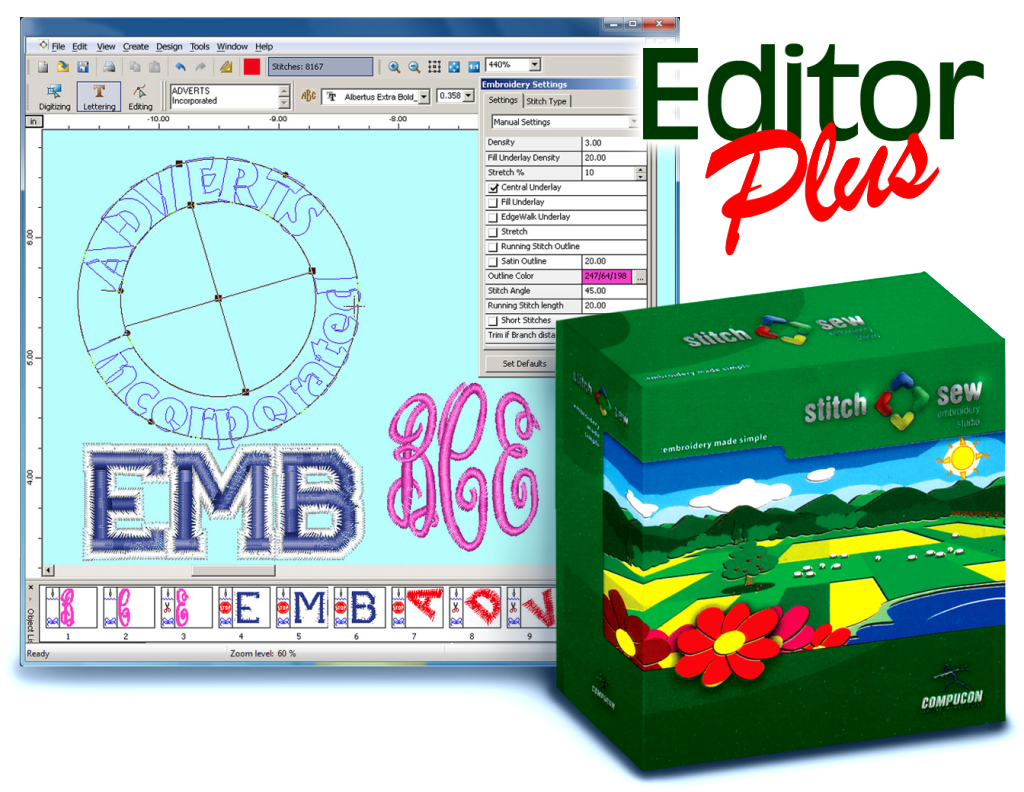
Text Creation Capabilities
- 71 Included Pre-digitized Fonts – quality script, monogram, block and serif fonts
- Lettering frames for custom text layouts in arcs, curved or shaped outlines
- Monogram feature makes traditional 3-letter monogram layouts fast and easy
- Full stitch settings for quality output on a wide variety of fabrics and garment types
- Combine/Edit Text with existing designs for additional ways to provide custom work
Editing Capabilities
- 71 Included Pre-digitized Fonts – quality script, monogram, block and serif fonts
- Lettering frames for custom text layouts in arcs, curved or shaped outlines
- Monogram feature makes traditional 3-letter monogram layouts fast and easy
- Full stitch settings for quality output on a wide variety of fabrics and garment types
- Combine/Edit Text with existing designs for additional ways to provide custom work
General Features
- Click-and-grab editing – easy to set colors, resize, rotate elements of a design
- Block List easily control cuts/jumps/lock stitches / sewing order between sections of a design.
- Multiple view modes simulated sewout modes, view/hide stitch points, outlines & other design elements
Stitch & Sew Studio

Key features
- Easy to use, intuitive interface
- Standard digitizing
- Auto Digitizing
- Fully Edit, Resize & Reorder
- 71 high quality fonts
- Convert True Type fonts
- Monogram input & fonts
- PhotoStitch
- Auto Cross-Stitch
- Magic Wand
- Applique creation
- Edit and switch between Embroidery recipes
- 3D Realistic View
- Write to Machine disk
- Direct loading of vector artwork from popular graphic packages
- Powerful Draw Package
- Tutorial & Internet help
- Quick Start guide & Training CD
- For Windows 2000, XP, Vista
Starting off, Stitch & Sew Studio possesses the full editing and lettering capability of Editor Plus, and adds further tools in both areas, including TrueType font importation and condensed level editing of digitized artwork.
For digitizing, Stitch & Sew Studio software adds a full suite of both traditional and automatic digitizing tools. Full, manual drawing tools are intuitive to use and make precise logo creation possible for operators at all skill levels. Throughout the creation process, Studio also makes it easy manage key stitch settings that help digitizers optimize designs for different fabric & garment types to maximize sewing quality. Topping it off, cutting-edge automatic digitizing and photo-stitch tools help digitizers save time and create quality embroidery artwork.
Turn your creativity into embroidery
Stitch & Sew is a full-featured, easy to learn digitizing package designed to provide commercial quality results.
Embroidery studio
- Easy Lettering
- Embroidery Settings wizard
- lots of available help!
HyperFont
Easily convert Windows True Type & Outline Graphic fonts into embroidery fonts
Magic Wand
Convert any area of an image into stitches.
Standard Digitizing & Editing
Use the Normal Fill, Column, Satin line etc. digitizing tools to create controlled, detailed designs. Everything digitized can be easily edited and changed.
Make use of the special Applique stitch type
Monogram Input
Take advantage of the high quality Monogram fonts.
AutoPunch Auto Digitizing
Automatically create designs from vector graphic images.
Embroidery made simple, now even more powerful!
Stitch & Sew Studio Plus

New features
Contains all features of Embroidery Studio, and these additional benefits:
- 100 high quality font
- 30 Lettering templates
- Name Drop sew logo & names from list
- Insert manual (hit, jump, sequin) stitches
- Add/change machine codes
- Sequin stitch type
- Send design as e-mail
- Direct loading of vector artwork from popular graphic packages
- For Windows XP, 7, and 8
- Easy to use, intuitive interface
For lettering capabilities, Studio Plus includes more font choices, shaping tools, and even a time-saving name-drop feature for batch customization.
Digitizers will appreciate the time saved with the fast manual stitch transition mode for fine detail and pathing, as well as the ability to work at the machine code level for better control of the sewout.
Throughout the entire creation process, the Plus level’s incremental enhancements to the Studio software – which come for a merely incremental price difference – provide the digitizer with a big jump in productivity, with more efficient tools and better control.
Unbeatable Functionality
Whether you are moving up and need more features or just starting out, the Embroidery Studio Plus level has all the Tools, Quality & Power you need to achieve impressive results.
Sequin
Be creative with digitizing. Sequin is available in standard digitizing tools such as normal fill and running stitch, but also as manually inputted sequin.
Stitch Edit
Edit even the smallest detail. Change machine codes for existing stitch files.
Monogram Input
Take advantage of the high quality Monogram fonts.
Name Drop
Add a list of names to sew with a logo. A different name will sew for each garment.
Standard Digitizing
Use the Normal Fill, Column, Satin line, Manual Stitches etc. digitizing tools to create controlled, detailed designs.
Editing
Everything digitized can be easily edited and changed.
100 high quality fonts & 30 Lettering templates
More fonts & frames to help you produce quality lettering effortlessly.
Embroidery made simple, now even more powerful!
Complete Feature and Level Comparison List
| Feature | Editor | SNS | SNS+ |
|---|---|---|---|
| General Functions | |||
| File Handling Functions | |||
| Open new/blank workspace | • | • | • |
| Open designs saved in popular home & commercial embroidery formats | • | • | • |
| Design browser – thumbnails browse through folders & designs | • | • | • |
| Save/ Save as: output to popular home & commercial formats | • | • | • |
| Design library – hundreds of included stock designs | • | • | • |
| Print/ print preview of designs | • | • | • |
| Import image as background for digitizing | • | • | • |
| Scanner input | • | • | • |
| Read/ write/ format machine disks | • | • | • |
| Enhanced format support for ZSK, KSM, Beat900, Melco EXP, Toyota 10o | • | • | • |
| auto Send design as email attachment + .jpg preview of design | • | ||
| View Functions | |||
| Zoom in/out | • | ||
| fullscreen view (hides toolbars/ menu bars) | • | ||
| Set background color | • | ||
| Toggle to view/adjust grid, ruler, stitch points, hoop | • | ||
| slow/variable-speed redraw / simulated design sewout | • | ||
| Show/ hide/ dock/ reset/ arrange toolbars | • | ||
| Realistic 3d simulation view | • | ||
| Pan onscreen | • | ||
| Design Manipulation Functions | |||
| Change dimensions, repeat, center, stitch cleanup | • | • | • |
| Parameter Setting Functions | |||
| Embroidery parameters: set properties of embroidery objects (for condensed designs) | • | • | • |
| System parameters; set program properties incl. metric<>inches | • | • | • |
| Graphic Functions | |||
| Drawing Package | • | • | |
| Help Features | |||
| Help (topics) | • | • | • |
| Tutorials | • | • | • |
| Diagnostics: auto-create troubleshooting report | • | • | • |
| Editing Functions | |||
| Select block or part of design (default setting when opening a design) | • | • | • |
| Move/ cut/ copy/ paste / delete selected block or part | • | • | • |
| Block editing (outline – stitch angle – start/end point) | • | • | • |
| Stitch editing – move/insert/delete stitches | • | • | • |
| Set “connection policy” (i.e. jump/ trim/ walk/ lock) between blocks | • | • | • |
| Change color of individual block | • | • | • |
| Change density of 1 or multiple selected blocks | • | • | • |
| Apply fabric presets (adjusts stitch settings) to single or multiple sections | • | • | • |
| Stitch processor for resizing / density adjustment for expanded (stock) designs | • | • | • |
| Block list: ability to reorder and easily edit blocks | • | • | • |
| Edit / switch between embroidery recipes | • | • | • |
| Embroidery settings window to display/ edit information (size, stitch colors) on selected block(s) | • | • | • |
| Modify code – edit special function of a stitch in stitch edit | • | • | • |
| Feature | Editor | SNS | SNS+ |
|---|---|---|---|
| Lettering Functions | |||
| Font styles | 71 | 71 | 100 |
| Lettering frames | 5 | 9 | 30 |
| Define lettering height and spacing | • | • | • |
| Advanced individual letter spacing | • | • | • |
| Monogram input | • | • | • |
| Define width/rotation angle of selected frame | • | ||
| Name drop | • | ||
| Digitzing/Creation Functions | |||
| Drawing Tools | |||
| Outline creation tool (open / closed outline) | • | • | |
| Branches creation tool | • | • | |
| Auto-creation of geometric shapes: rectangle/ circle/ellipse/ polygon/ star | • | • | |
| Magic wand – auto-draw complex shapes with 1 click | • | • | |
| Fast manual stitches | • | ||
| Special functions – machine code editing: Stop, cut, jump, hit, sequin on/off | • | ||
| Stitch types with editable embroidery recipes | |||
| “Runing Stitch” | • | • | |
| “Satin Line” | • | • | |
| “Normal Fill” / “Complex Fill” | • | • | |
| “Column Fill” | • | • | |
| “Cross-Stitch” | • | • | |
| “Applique” | • | • | |
| Stitch Types |
|||
| Satin | • | • | |
| Step satin (turning satin fill) | • | • | |
| Step 1/1 | • | • | |
| Step 1/2 | • | • | |
| Step 1/3 | • | • | |
| Random step | • | • | |
| Pattern Step | • | • | |
| Elastic Step | • | • | |
| Motifs | • | • | |
| Sequin | • | ||
| Embroidery (stitch) Settings |
|||
| Density | • | • | |
| Underlay | • | • | |
| Stretch (pull compensation) | • | • | |
| Inserts | • | • | |
| Long Satin | • | • | |
| Tie in/off | • | • | |
| Auto-outline: Satin and running stitch outline | • | • | |
| Fill Gradient | • | • | |
| Jagged edge satin & random stitch | • | • | |
| Sequin | • | ||
| Options | |||
| Functions | |||
| Hyperfont – auto TrueType font conversion | Option | • | • |
| Get more at embmarketplace.com | |||
| Additional embroidery designs | Option | Option | Option |